
Light and Dark Mode
Designing for Accessibility, System Scale and User Control
Role: Product Designer
Scope: UI systems, Accessibility, Prototyping
Duration: 1 day - Short project
Platform: Mobile
Design Tool: Figma
Challenge
Many apps offer light and dark themes, I often noticed that one mode is prioritized over the other, while investigating the influence of both interfaces, it revealed that users seem to have a stronger preference for dark mode because it’s associated with comfort and reduced eye strain, particularly in dimly lit areas. Reference
Goal: Challenge myself in replicating a light and dark modes in Figma, to emphasize accessibility, contrast and adaptability. This was an opportunity to strengthen my skills in design systems and inclusive UI design.
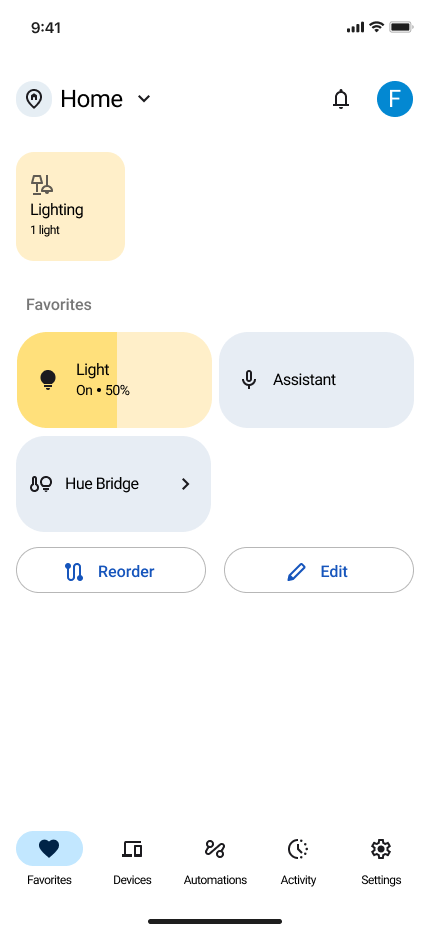
I used Google’s Home app to showcase my skills for this short project, leveraging WCAG 2.1 standards and tools like the Stark Contrast and Accessibility Checker to validate color palette and typography decisions. Dark mode was treated as a visual toggle, not a system-level constraint.
Design approach
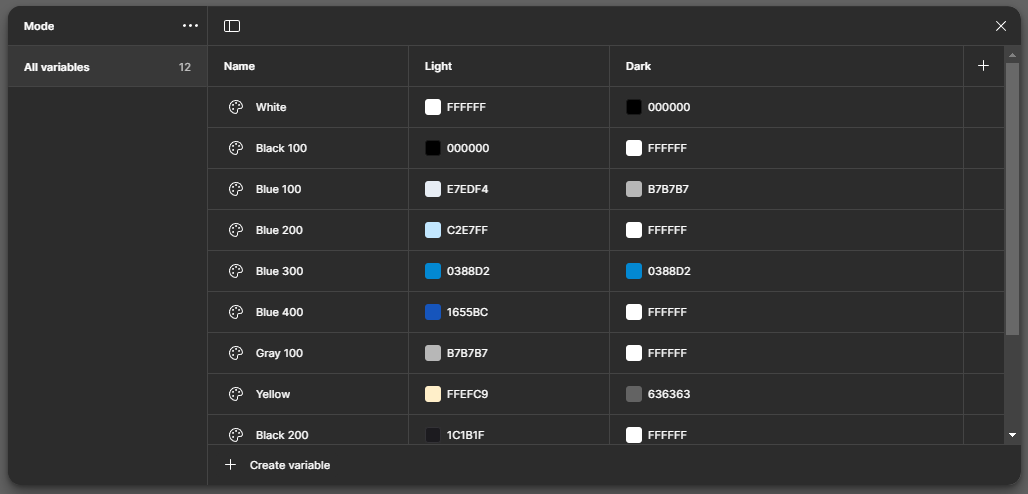
Instead of duplicating screens, I designed a token-driven theming system that supported light and dark parity across components.
I then:
Defined semantic color tokens (background, surface, accent, feedback states)
Established contrast standards aligned to WCAG guidelines
Mapped component states across themes (hover, pressed, disabled)

Tradeoffs considered
Pure black vs elevated dark surfaces for readability
Brand color fidelity vs accessibility contrast thresholds
Visual consistency vs engineering performance constraints
Outcome
Built an accessible dual‑mode UI that meets WCAG contrast standards and works equally well in light and dark modes.
Impact
Accessibility first: Designing for contrast and readability made me more confident with WCAG standards.
Design systems thinking: Using tokens in Figma gave me growing knowledge for scalable systems.
User context matters: Mode switching is not just a feature, it directly impacts comfort, usability, and inclusivity.
Recreating Google’s home app on iOS mobile, gave me hands-on practice in applying accessibility standards and using Figma tokens. It gave insight into how small details like color contrast and mode switching can have a big impact on inclusivity and user comfort. As a designer, it showed me how to combine craft and systems thinking to create interfaces that are adaptable to different user contexts.